It's Me ! - Shared Galaxy Wonder

Rabu, 19 September 2012

[MOD] Geeky Engine


About Geeky Engine
Geeky Engine is a Script package By Me ..It Contains New Features and Iprovements!! And its much much better then some engines.


What can it do ?
Can make your phone

From


To


me & my Geeky Engine are not responsible for your bricked/****ed/cracked devices or xda
if you came me with bricked phone i will laugh at you.
Installing it means you accept it.
Make Nandroid before flashing...


Features


Some xbin tweaks
Many init.d tweaks
Many ddefault.prop tweaks
VM Tweaks
SD card tweak
Better Battery Life through Battery Tweaks
Reduced /dbdata, /data, /sdcard usage of *.db files and faster database access. | World first smart sqlite optimizing
Increase touchscreen sensitivity
much of prop tweaks
CWM Flashable
Less lags through LMK Tweak and Various VM Tweaks
Almost every tweaks for Android -_-


Requirements


Brain
Eyes
Phone (android)
2.2 + phone
2-3 MB free space on phone
Rooted phone
clockwork mod or any recovery that can install edify scripted things..
kernel having init.d support

Download

How to install

1 Download Engine (attachment)
2 Place in SD
3 Delete all script in folder system/etc/init.d
4 goto recovery
5 Mount / System
6 flash ' Geeky_Engine_By_Forever_King '
7 Reboot
8 DOne :P


Things to Remeber


Having Eclair? try it may work.
work with 2.2+ any phone
will work on CM9/10
Dont spam this thread
Dont ask me 'it will work with my phone or not
If u wanna put Geeky Engine in your Rom.. ask me thru PM ( i iwill allow you) with credits...


Sumber : xda-developers

Jumat, 31 Agustus 2012

[ROM][Android 4.0.4] RemICS - SIII look

REMICS ROM FOR Galaxy W I8150


KNOWN ISSUES!
  • partial camera working with 3rd party apps.
[LIST]bugs similar to cm9
Instructions(Installation Steps) - YOU MUST READ THIS!
Step by step
  • 1. wipe data,cache,dalvik cache and format system
  • 2. install rom (no need for gapps as it is included)
  • 4. wipe data,wipe cache,dalvik cache and FIX PERMISSIONS
  • 5. Reboot system
  • 6. Wait till full boot of your phone

Base: CM9 Alpha 8 by Arco68
INFO
Samsung GALAXY S 3 Like UI
Samsung GALAXY S 3 TouchWiz Nature UX Launcher
Samsung GALAXY S 3 Stock Wallpapers
Samsung GALAXY S 3 Live Wallpapers - Deep Sea and Luminous Dots
Samsung GALAXY S 3 UI Sounds
Samsung GALAXY S 3 Shutter Sound
Samsung GALAXY S 3 Lock , Unlock Sounds
Samsung GALAXY S 3 Icons
Samsung GALAXY S 3 Ringtones
Samsung GALAXY S 3 Alarms
Samsung GALAXY S 3 Notifications
Samsung GALAXY S 3 Like Phone Dialer
Samsung GALAXY S 2 Style Call Receive

TouchWiz like Status Bar
Andrew Neal's Version of DeskClock
Tweaked SystemUI and framework-res
Sony Walkman Music App
Edited Phone , Contacts and Messaging App
Added latest Google Apps
Apollo Music Player
Black Hole Live Wallpaper
Gummy Bean Live Wallpaper

ScreenShoot:


DOWNLOADS : 

Download 1.8

Changelog:

Upgrade to beta 4
improvement fix 


Download 1.7
Changelog:

Upgrade to beta 3
Minor fix 


Old : 
Download 1.6
Changelog:
Working s3 weather
Now we have to install the gapps(Incoming rem-gapps by me)
Fixed torch
Based on cm9 beta 2.
PS: I've seen just now the new cm9 beta 3 so I don't know when but I'll upgrade again my rom in near future.
So for now enjoy new remics

Download  1.5
Changelog: 

Based on cm9 beta 1
Weather widget fixed
bug fix as cm9
more stability

RemICS 1.4
Changelog:
Based on cm9 alpha 8
System crashes fixed
Deepsleep fixed
Brightness softkey fixed
Camera fully working
More smooth
Setting/advanced doesn't work because we haven't bln support
Voicesearch.apk removed, you have to install it from Play Store
And other stuff[

Minggu, 26 Agustus 2012

[ROM] [ICS 4.0.4] [AOKP] InDroiD REMICS


Link InDroiD REMICS V 2.2 : Download
Link InDroiD REMICS V 3    : Download
Link InDroiD REMICS V 4.1 : Download
Link InDroiD REMICS V 5.1 : Download
Link InDroiD REMICS V 6    : Download


1. Reboot to Recovery.
2. Make a NANDROID BACKUP first
3. Before install wipe data & factory reset is recommented
4. Select the ROM zip from your SD Card and flash
5. Go to Advanced -> Reboot Recovery.
6. After the Recovery restarts, Wipe Cache .
7. Reboot


Code:
InDrOiD REMICS 5.1 :

- BASE CM9 BETA 2 BY ARCO AND AOKP  BY BZS173 

- CM9 BETA2 KERNEL

- UPDATED ADRENO LIBS

- REVERTED WIFI DRIVERS

- ADDED DSP MANAGER

- ADDED WALKMAN PLAYER

- ACID MOD SOUND ENGINE 2  WITH BEATS AUDIO , XLOUD , CLEAR BASS ETC.

- MAXIMUM AUDIO RE-SAMPLING

- UPDATED TERMINAL EMULATOR

- ENABLED GPU RENDERING 

- UPDATED MAPS

- REMOVED FLIPBOARD

- UPDATED NSTOOLS

- SOME MAJOR GRAPHIX CHANGES IN CONTACTS AND FRAMEWORK AND SYSTEM UI

- THEMED ROM MANAGER

- ACCURATE WEATHER WIDGET

- NEW THEMED  TOGGLES

- TWEAKED BUILD.PROP

- AND MUCH MORE

InDrOiD REMICS 4.1 :

- BASE CM9 V1 BY ARCO AND AOKP MILESTONE 6 BY AOKP TEAM

- UPDATED APN LIST

- ADDED NOVA LAUNCHER

- SOME GRAPHICS CHANGES IN FRAMEWORK AND SYSTEM UI

- FIXED JELLY BEAN ANIMATIONS

- UPDATED WIFI DRIVERS

-  NEW AOKP BOOTANIMATION

- UPDATED ALSA DRIVERS

- UPDATED BEATS AUDIO LIBS 

- BLUE ELEGANCE THEME BY ARTVANDELAY 440 

- MAXIMUM AUDIO RESAMPLING

- ENABLED GPU RENDERING

- TWEAKED BUILD.PROP

AND MUCH MORE THAT I DID NOT REMEMBER
InDROID REMICS V3 :

- FIXED PLAYSTORE

- REMOVED WALKMAN PLAYER

- FIXED POPUP NOTIFICATIONS WHEN YOU OPEN A  FILE IN ANY FILE MANAGER ( Header box was little smaller)

- MAXIMUM AUDIO RE-SAMPLING (Re-Sampling sound to 48kHz!)

- ADDDED APOLLO AGAIN

- FIXED AUDIO EFFECTS.CONF

- FIXED TOUCHWIZ FC AND ADDED APEX LAUNCHER

- REMOVED TREBUCHET LAUNCHER 

- REMOVED SOME UNUSED LIBS 

- SOME MAJOR GRAPHIX CHANGES IN CONTACTS AND FRAMEWORK AND SYSTEM UI

- GLOWING TOGGLES

- ADDED NEW ANALOG SIMPLE CLOCK 

- UPDATED HOSTS FILE

- UPDATED BUILD.PROP

InDROID REMICS V2.2 :

- FIXED MARKETBUG

- HOLO RED AND HOLO PURPLE THEME IS ADDED

- ADDED SONY WALKMAN PLAYER

- TWEAKED BUILD.PROP
 
InDROID REMICS V1 :

- BASED ON AOKP MILESTONE BY BZS173 AND RESURRECTION REMIX 2.6.1

- CM9 KERNEL BY ARCO88

- IMPROVED PERFORMANCE AND STABILITY AND LESS LAGS &  AMAZING SOUND

- ADDED RESURRECTION SETTINGS IN SETTINGS

- RESURRECTION REMIX   WALLPAPERS ADDED

- INBUILT GAPPS NO NEED TO DOWNLOAD GAPPS

- HYBRID LAUNCHER AND TOUCHWIZ UX IS ADDED 

- ADDED BEATS NOTIFICATION

- UPDATED BEATS AUDIO LIBS  FROM HTC REZOUND

- ADVANCED LINUX SOUND ARCHITECTURE FROM 0.96 BASE (a.k.a ALSA)
 
- NEW DIGITAL CLOCK

- UPDATED GS III ALARMS / RINGTONES / NOTIFICATIONS

- NEW GS III ICONS FOR APPLICATIONS

- PORTED JELLY BEAN ANIMATIONS 

- SONY XLOUD ENGINE ADDED

- BRAVIA ENGINE INCLUDED

- GALAXY S3 THEME 

- SRSPaneL 

- TERMINAL EMULATOR ADDED 

- FACELOCK REMOVED 

- ADDED DOCK MODE

- NS TOOLS APP ADDED

- NEW BOOTANIMATION 

- ADDED MEMO  FROM S III

- ADDED FILE EXPLORER  FROM S III

- ADDED  FLIPBOARD 

- ADDED  YAHOO NEWS WIDGET

- UPDATED APOLLO MUSIC PLAYER

- AUDIO INIT.D TWEAKS

- ADDED SPARE PARTS

- FASTER FIX IS ADDED

- TWEAKED GPS  & FASTER  GPS LOCK

- UPDATED BUILD.PROP

AND MUCH MORE


BIG THANKS TO :

XDA DEVELOPERS
BZS173 & KANG TEAM FOR AOKP
WESTCRIP FOR MAKING RESURRECTION REMIX
RESURRECTION REMIX COMMUNITY
HERTZWOND FOR TESTING AND VIDEO
AND OF COURSE TO ALL THE SUPPORTERS AND USERS


Sumber : xda-developers

[ROM][ICS]Aokp-Milestone6-iattilagy

Update :
Link Download ROM (19.09) Download
Link Download Gapps : Download

Old :
Link Download ROM 17.09 Download
Link Download ROM 21.08 : Download

INSTALL THIS AT YOUR OWN RISK!

UPDATED!

Updating:
1.Flash current zip
2.reboot
3.reboot recovery
4 reflash gapps

Installation:
1.Backup all your data
2.Wipe everything
3.Install  with CWM5 (tested) or CWM 6.0.1.2
4.reboot
5.reboot recovery
6.Install gapps zip
7.reboot and enjoy


Thanks to:
-arco - whoes cm9 configs this rom is based on
-developers of AOKP rom - I just ported their work

Changelog:
19.09
-BFS (Brain F*k Scheduler) added to the kernel

17.09
-Base updated to cm9 beta build 1
-new kernel, I have ported CastagnaIT's one
-overclocking (note I haven't included undervolting, I will fix it soon)
-I recomend to change to smartassv2 governor
-Only gpu rendering

21.08
-added data, 2g and acces point toggle
-added Mms app
20.08
-first public zip

Older versions:
- There's 20.08 but its not uploaded.

Now sd switching from Settings/strorage aviable in aokp too

Bug list is the same as cm9, if you found any aokp specific bug please post in this thread.
At this time the following:
What's working:
Audio
Receiving and making calls
GPS
Compass
Proximity sensor
Wifi
Bluetooth
USB mass storage
HW accelerated gui
HW accelerated video
Camera

Not working:
FM radio (Not supported in AOKP yet)
USB tethering

Sumber : xda-developers

[ROM][i8150][OFFICIAL] EHNDROIX [STABLE][4.0.4][CM9]


Link Download :
EhndroiX 12.9.13 Download
S III Style Pack Download

EhndroiX 12.8.31  Download 
S III Style Pack Download

 Features

  • Based on CyanogenMod
  • New Theme
  • Official Bootanimation
  • Google Apps perfected and in Black Style
  • Apex Launcher
  • Send messages with exclusive app Nitrox with a transparent look very attractive
  • Shake your phone for close all apps
  • Beats Audio Equalizer
  • Flash Player integrated
  • Optimized for HD YouTube videos via 3G and WI-FI
  • Jellybean Wallpaper
  • ROM in constant development and with the new way of counting, it will be much easier to know the version in possession
  • Keep your data safe with Titanium Backup installed by default
  • ... and much more!
Screenshots 

Guide to proper installation
________________________
Cara install dari ROM EhndroiX:

  • Download ROM
  • Wipe Cache
  • Wipe Dalvik / Cache
  • Flash EhndroiX
  • Restart

Cara install dari ROM CM7/CM9/AOKP/MIUI:
  • Download ROM
  • Wipe Data
  • Wipe Dalvik Cache
  • Flash EhndroiX
  • Restart

Cara install dari Gigerbread ROM:
  • Download ROM
  • Download CWM Recovery
  • Flash CWM Recovery
  • Wipe Data
  • Wipe Dalvik Cache
  • Flash EhndroiX
  • Restart

Cara install dari Stock Samsung ROM Gingerbread 2.3.5/2.3.6:
  • Flash Recovery CWM by Odin
  • Wipe Data
  • Wipe Dalvik Cache
  • Flash EhndroiX
  • Restart

bagi yang ingin mulai dari Stock ROM: :
  • Flash Stock ROM via Odin (the latest version recommended)
  • Flash Recovery CWM by Odin
  • Wipe Data
  • Wipe Dalvik Cache
  • Flash EhndroiX
  • Flash ROM
  • Restart


    Sumber : xda-developers

[ROM][MOD][ICS]Digital.AOKP-Milestone6.I8150.BZS

SS


Link Download : Download

Installation:
1. Use CWM from Arco
2. Backup your important data
3. Wipe: data, cache, dalvik-cache
4. Flash update*.zip(Gapps not needed) Basic things included in the rom
6. The first boot after restart

Changelog:
- v0.9fix:
Play Store download bug fixed.

- v0.9:
-Removed:
Achromatic,AOKPtips,Apollo,FileManager,Gallery2,La uncher2,LiveWallpapers,MagicSmokeWallpapers,Microb es,MusicFX,
NovaLauncher,PhaseBeam,Superuser,SwagPapers,Unicor nPorn,VideoEditor,VisualizationWallpapers.
-Added:
ChromeBookmarksSyncAdapter,Gmai,GoogleCalendarSync Adapter,GoogleContactsSyncAdapter,GoogleLoginServi ce,
GoogleQuickSearchBox,GoogleServicesFramework,Googl eVoice,MarketUpdater,MediaUploader,NetworkLocation ,
Phonesky(3.8.17),PicFolder(2.3.1),SecLauncher2,Sup erSU(0.95),Talk,TotalCommander(1.0.3),YouTube(4.0. 23).
-Modded:
-SystemUI- StatusBar date bugfix, Lang update.
-Theme
-DeskClock
-ROMControl
-Contacts
-Animation
-Sound
-GPS
-Fonts 

Sumber : xda-developers

Sabtu, 21 Juli 2012

Tutorial Swap Memori Galaxy Wonder di Rom Gingerbread

http://image.made-in-china.com/4f0j00DeEtpLTjjlza/Hot-16GB-Micro-SD-Memory-Card-TF-Card.jpg


ane mau jelasin cara swap memori di galaxy wonder atau yg gatau swap itu apa disini ane bakal jelasin. Swap itu menukar memori yg tadinya internal jadi eksternal begitu juga sebaliknya internal jadi eksternal.
Jadi kita tidak perlu memikirkan memori galaxy wonder yg hanya 2GB, itu terlalu kecil jika kita mau install game-game HD atau install aplikasi yg banyak, jadi tidak perlu takut kepenuhan hehehe
Nih gan tutornya :
  1. Root dlu yah wondernya kalo yg blom di root liat ini aja Tutorial Root dan Unroot Galaxy Wonder
  2. Download root explorer disini Root Explorer (2.19).apk
  3. Download data swapnya vold.fstab 
  4. Taro filenya dimana aja yg penting agan gampang nyarinya.
  5. Kalo udah buka root explorer kalo ada notif superuser allow aja 
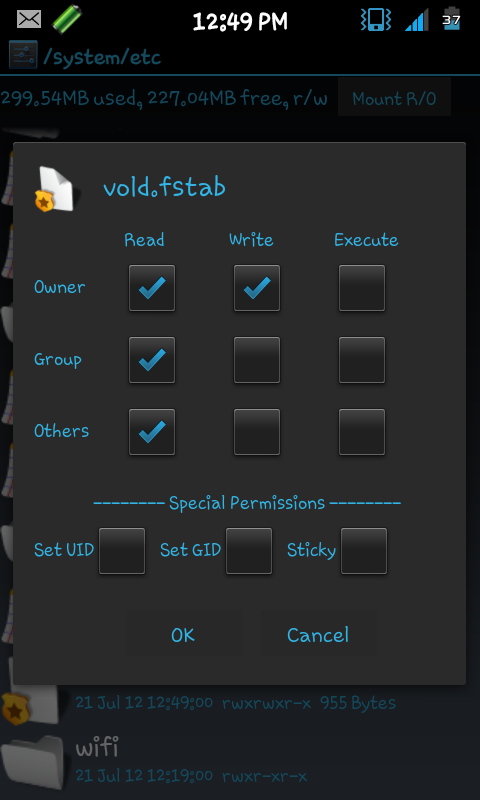
  6. Copy file vold.fstab yg udah kita download tadi taro di system/etc paste disitu overwrite aja jgn lupa di R/O dlu
  7. Tekan trus vold.fstab nya sampe ada opsi - opsi
  8. Pilih permisiion
  9. Check permission seperti gambar dibawah ini


10.  Restart
tinggal cek aja di setting - storage

nih screenshoot di wonder ane,berhasil kok
Before :


After :


nih file untuk ngembaliin seperti semula / Unswap istilahnya 
Download 
extract dlu filenya ya
.cara copy paste nya sama kya di atas cek permission nya jg sama kok trus restart beres deh
.semoga bermanfaat yah

Rabu, 18 Juli 2012

Custom ROM Galaxy Wonder

apa itu Custom ROM atau CusROM ialah ROM yg sudah di kustominasi oleh personal maupun developer.
Langsung aja ye gan, ane mau kasih tau cara Custom ROM di wonder:
  1. sudah di root
  2. sudah install CWM di androidnya yg gatau CWM atau mau install CWM liat disini yah Install ClockWork Mod di Galaxy Wonder 
  3. kalo udah istall masuk recovery mode
  4. pilih install zip from sdcard
  5. pilih choose zip from sd card
  6. pilih rom yg sudah agan" download tadi biasanya cusrom wonder berformat .zip 
  7. lalu pilih install tungguin sampe selesai
  8. reboot
  9. tapi kalo nemu cusrom melalui sistem restore pilih backup & restore 
  10. pilih lagi restore from eksternal sdcard
NB : biasanya kalo udah install CWM udah auto ada folder Clockwordmod di eksternal sdcard

berikut link download custom rom nya :

Gingerbread:

RebelROM 3.0 Milestone 2
Download

FAW : For All Wonders (Rls2)
Download

FAW (Rls3)
 Download

FAW (Rls4) Special Edition
Download

F.A.W New Slim 
Download 
F.A.W New Slim Apps Removed in F.A.W. Special and slim 
Download 
NB : install dua - duanya ya gan 

Gaming Rom Dxlm3
Download

DXLM3 Xperia v2
Part 1  Part 2
NB : Join file dengan HJ Split yah , khusus Rom DXLM3 Xperia V2 ini kalo sudah di join filenya extraxt filenya lalu folder nya copy di eksternal sdcard/clockwordmod

XXLM8 Bagux Project ROM v1.4
Download

Wond3r v1 Rom DXLM3
Download

Mutant rom V1.2 Argentum + Mutant ROM Patch 1.2 Argentum
 Download + Download

[Cusrom] [Aroma] [PDROID] Mutant ROM 1.3 Arsenic 
Download
 
Wapak Rom v 1.1 + [PATCH]Wapak Rom Theme Link
Download + Download

[Cusrom] [EZLicious] 
Part 1  Part 2

[EZLicious] Holo Launcher & Holo Locker
Download 

[Cusrom Patch] [EZLicious]
Download 
NB : gabungkan file Part 1 dan Part 2 menggunakan HJ Split , install semua ya gan filenya  

[CusRom] Black Notes 
Part 1   Part 2  
[Update Pack] For Black Notes
Download 
NB : di ekstract part 1 nya aja yah ntar part 2 nya ngikut trus foldernya masukin di folder CWM lalu flash lewat restore di cwm recovery . untuk update packnya langsung flash aja via cwm

[Cusrom] CyanogenMod 7 UnOfficial 
Download 
GAPPS for CM7 UnOfficial  Download

[ ROM ] [ BACKUP AND RESTORE ] Stock Gaming Rom Stable i8150XXLM8
Read more 

[ROM] [BACKUP & RESTORE] [GAMING] Simplified GB with S3 Look
Read more 
  
[CUSTOM ROM][GT-I8150][2.3.6][HIDDEN PROJECT BLUE AND WHITE SENSATION][FAST][READY FOR GAMING]
Read more 


Ice Cream Sandwich :

MIUI ICS Alpha 4
Download

MIUI v.4 2.6.29 ( Tanpa install Gapps )
Download

[ROM] XPERIA ARC STABLE VERSION (FIXED) [Based CM9] 
Download password : androidlover
aplikasi xperianya extraxt trus install biasa aja yah Download pass : androidlover , pass .rar : aselole

[Cusrom] Paranoid Android RC 1.7a
Download
GAPPS for Paranoid Android RC 1.7a
Download


[ROM][I8150]PARANOIDANDROID Ecstacy[RC1.8a][ICS 4.0.4]
Download
gapps
Download

[ROM][I8150]PARANOIDANDROID Ecstacy[RC 2][ICS 4.0.4][HYBRID][STABLE]UPDATE[17/09/12]
Download
Gapps
Download

[ROM][MOD][ICS]Digital.AOKP-Milestone6.I8150.BZS
Read more

[ROM][i8150][OFFICIAL] EHNDROIX [STABLE][4.0.4][CM9]
Read more

[ROM][ICS]Aokp-Milestone6-iattilagy
[ROM] [ICS 4.0.4] [AOKP] InDroiD REMICS
[ROM][Android 4.0.4] RemICS - SIII look
[ROM][ICS][IMM76L] CyanogenMod 9 BETA (Build 3)
Read more

[ROM][MOD][ICS][JB]Digital.I8150.BZS
[ROM][OTA]╠ BioHazard v.4 ╣
PARANOID ANDROID BUILD 2 

[Rom] [Kernel] Xperia ICE Stable
[ROM][I8150]PARANOIDANDROID Ecstacy[RC 3]

[TWEAK TEAM ROM][PRA TRY OUT][CUSTOM ROM][CM9 B3 TASTE GALAXY S]

[ROM] MIUI-ics 2.810 MULTILANG [4.0.4][Stable-Smooth-Performance]


Tambahan : Khusus Custom Rom ICS / CyanogenMOD 9 install Gapps  Download

mau tau lebih lanjut dari twitter aja :
isPutraa

Install ClockWork Mod di Galaxy Wonder

Pertama apa itu ClockWork Mod Recovert (CWM) Jadi secara singkat, CWM itu adalah recovery mode yg sudah di kustomisasi sedemikian rupa dengan berbagai fungsi tambahan seperti backup/restore,instalasi dan lain-lain yg tidak ada di recovery mode standar.

Kalo anda mau pake Custom Rom di android anda bias melakukan flash via odin maupun via CWM ini, namun disini saya akan menjelaskan melakukan Cusrom lewat CWM akan tetapi meninstall CWM di android kita harus lewat via odin.

Oke langsung saja kita install CWM di android Wonder kita
  1. Sudah di root
  2. Download file ini  Download extract dimana saja
  3. Open Odin multi downloader
  4. Klik OPS masukan file OPS di file yg tadi kita extract
  5. Klik One Package dipaling bawah masuk kan file recovery CWM nya 
  6. Centang One Package , Auto Reboot , Protect OPS sudah itu saja
  7. Matikkan android wonder anda tekan tombol power + Volume Down + Home kalo sudah keluar warning lepas semua tombol sekarang tekan tombol volume up 
  8. Baru colokkan android wonder kita ke PC via USB sampe android wonder kita terdetect seperti dibawah ini :

8.       Kalo sudah ke detect langsung aja klik Start tunggu sampai selesai  cabut android wonder kita dari PC sampai seperti ini :

9.       Kita cek aja langsung, matikan android wonder trus tekan dan tahal tombol power + tombol home + tombol volume up jika sudah keluar logo Samsung lepas tombol power tetapi tetap tahan tombol volume up + tombol home lepas semua tombol jika sudah masuk CWM.
10.   untuk navigasi tombol volume Up dan volume Down , untuk back touch aja back di HP kita
11.   sekian dan selamat mencoba 

NB : [RECOVERY] ClockworkMod v6.0.1.0 Download
mau tau lebih lanjut dari twitter aja :


Jumat, 15 Juni 2012

Tubemate

mau sharing lagi nih gan
bagi agan-agan yang mau download video di youtube lewat hp androidnya tapi gatau caranya nih ane kasih tau gan ada aplikasi yang bisa buat nonton + download video di youtube


nih gan link downloadnya  Tubemate 

Selamat mencoba gan


Tutorial Root dan Unroot Galaxy Wonder


ROOT
gan ane mau ngeshare aja nih cara root dan unroot di galaxy wonder
tapi sekilas ane mau ngasih tau juga tentang root

root android adalah untuk memberi hak penuh kepada pengguna android untuk dapat masuk ke sistem android. Dengan melakukan root, pengguna dapat menambah, mengurangi maupun memodifikasi file-file atau data-data yang terletak pada sistem android yang bila dalam keadaan standar (belum root) file-file tersebut tidak dapat diakses. Bila dianalogikan sistem operasi komputer window, fungsi root android adalah memberi hak administrator kepada pengguna.

Kelebihan root android :

  • Dapat menginstall aplikasi yang membutuhkan akses root
  • Dapat menginstall costum room
  • Dapat melakukan pengaturan untuk memaksimalkan kinerja ponsel
  • Dapat uninstall aplikasi bawaan pabrik
Kekurangan root :
  • Dapat menghilangkan garansi handphone
  • Masalah keamanan

 udah gan cukup segitu aja nih gan step by step nya


  1. pertama download dulu file ini gan ROOT nama filenya update.zip , kalo udah di download taro file nya di memori internal ya gantrus matiin hp nya gan
  2.  kalo udah teken tombol power + home + volume up bareng gan kya gini nih 
  3. kalo dah keluar samsung lepas tombol power tapi tahan tombol volume up + home nya sampai keluar tulisan galaxy wonder kalo dah baru lepas gan semuanya 
  4. kalo dah keluar logo kotak+android teken tombol ini gan kalo udah ntar ada pilihan :


  • reboot system now
  • apply update from sd card
  • wipe data/factory reset
  • wipe cache partition
  • install fota
pilih apply update from sd card trus cari file update.zip yg agan download tadi trus pencet tombol home kalo udah back trus pilih reboot system now 

dan selama hp agan udah ter root


UNROOT

buat unroot simple banget gan sama cara nya kya di atas cuma file yg harus di download ini UNROOT nama filenya unroot.zip sama langkah-langkahnya kya di atas gan cuma pas di pilihan apply update from sd card nya agan pilih unroot.zip jgn yg update.zip

udah cukup sekian ya gan dari saya
cuma mau sharing aja
selamat mencoba !!!! DWYOR